Category: Education

Another teaser…Fill the Frame!

With only a week left before the next Intro to DSLR class, I thought I’d send out another little teaser with some other information that students who attend the class will learn.

Fill the Frame

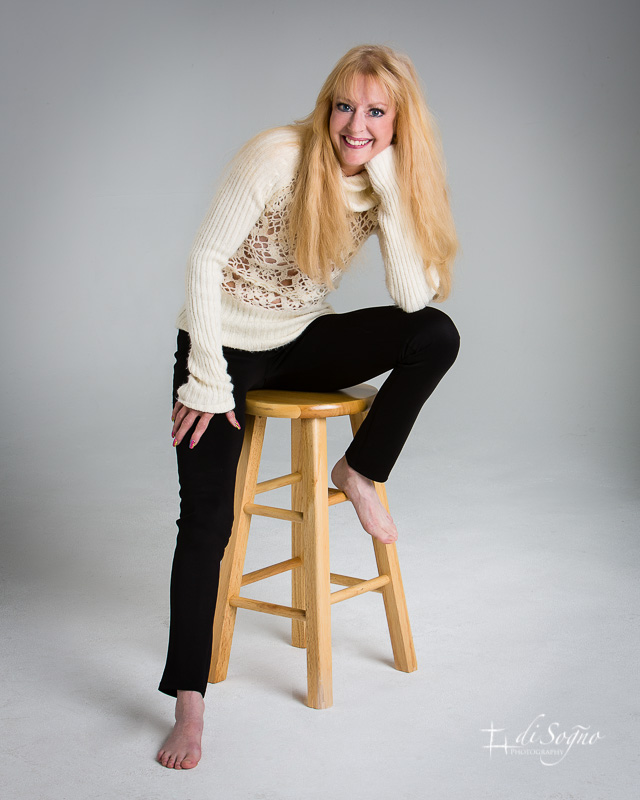
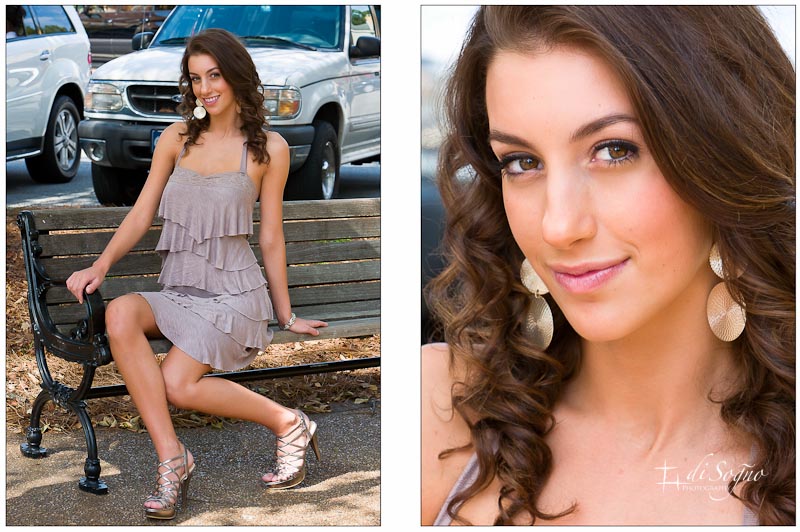
Making the subject too small in the frame of an image can make the viewer wonder what the intended subject is.  The image above left was intended to display a bit of Rachael’s personality and highlight her smile.  While we can see her smile, when I look at this image, my attention drifts away from her to the items that surround her on the ground and in the background.  This is the result of her being relatively small in the frame (and maybe because I’m getting older) and having a cluttered background.

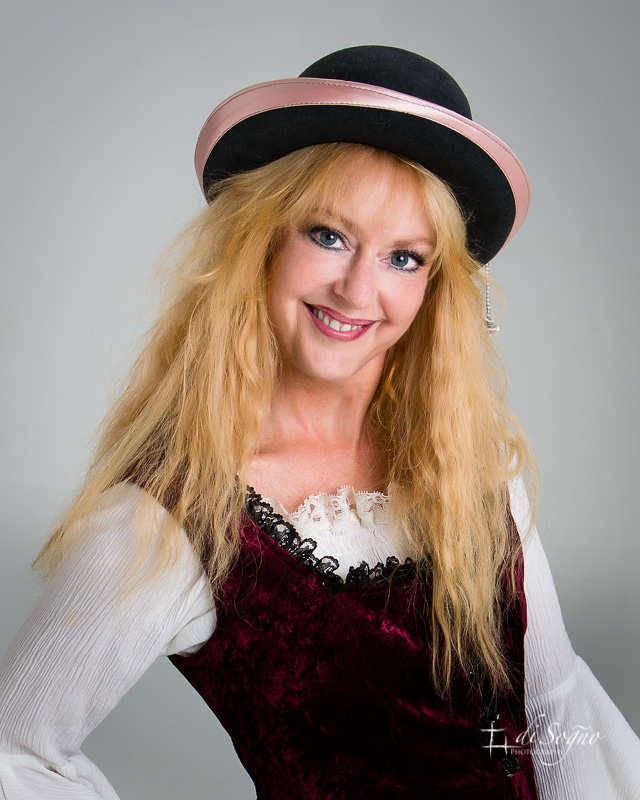
In the image on the right, she fills the frame of the photograph, her gaze keeps my attention where it should be and we’ve removed the distracting background clutter.  This image shows some of Rachael’s personality, and highlights her eyes and fantastic smile instead of letting the viewer check out all of the other stuff.

The upcoming February class is the last one for this quarter.  I’ve tentatively scheduled the next class for sometime in May.

Oh!  Before I forget, we will not have class on Tuesday February 14, I think we’d all like to be somewhere else that evening.  We’ll decide when to move that date on the first night of class.

Okay that’s it for now.  Hope to see you in one of the classes!


Spotlight Video Interview

An interesting thing happened to me at a meetup…a video was produced!

Last week, in the sponsor spotlight section of the meetup “It’s a Great Day for Business Atlanta”, I was interviewed by a group panel consisting of Louis Agudo, Lorrie Todd, Todd Wilson and Eric Romero.

This meetup group supports small businesses by showcasing established and emerging small business owners to reveal their secrets of success.  One of the ways they do this is by creating videos, shot by Randall Philips of PDB Group Ventures, to add to their blog, website or just leaving it posted on YouTube to increase their internet presence.

In the video below, you’ll discover a few interesting bits about me, my approach to commercial photography, why I created di Sogno Photography and started teaching a course on photography.

Those were some great questions and I want to say thanks to Louis, Lorrie, Todd, Eric and Randall for creating this video.  If you’re interested to know more about the meetup, check it out at meetup.com.  In the meantime, it’s back to creating images for my business clients for me!

A little teaser…Depth of Field

With the questions I’ve been getting about the introductory photography course I teach, I thought I’d start giving a little teaser from time to time and share some of what is covered in the course.  So here’s the first one!

Depth of Field

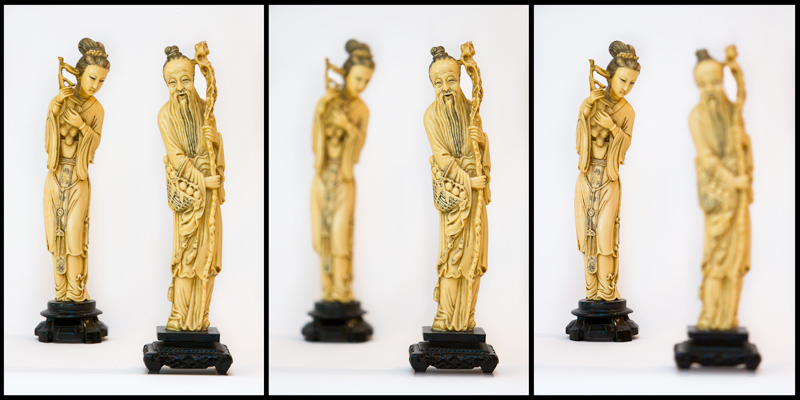
Without a focus, we drift around not being very successful at anything we may do.  The same is true for an image, without a focus, the viewer doesn’t know where to look and the image isn’t very successful.  Depth of Field (DOF), defined as that part of an image that is acceptably sharp, provides creative control over what is in-focus or not in-focus in the image.

The figurines in these images are twelve inches apart and by changing the aperture to control the DOF,  the photographer can isolate individual figurines or have them both in-focus thereby controlling the focus of image and where the viewers attention is going to stay.

This is just one of the many tools students in my Introduction to DSLR Photography & Creating Better Photos class learn to use.  So if you or someone you know would like to learn more about photography, check it out by clicking the above link.

That’s it until the next time!

Training Now Available

For the past few years, people I’ve met have been telling me that if I had a class on digital photography, they would attend.  I’ve listened to them and I’m pleased to say that I have added a new service to my business, training.

I am now doing personalized individual or small group (up to 5 students) training.  This training is fully customizable for the student’s needs and is targeted at the beginning or intermediate photographer who cannot find time for a regularly scheduled class but wants to better their skills.  Click on ‘TRAINING’ in the main menu to find out more info and pricing for this training.

I have also developed and published a new classroom style training course called ‘Introduction to DSLR Photography & Creating Better Photos’.  This course is a hybrid of a digital photography 101 class and a photographic composition class.  It’s designed to be given in four (4) evenings over two weeks and covers some of the technical aspects of photography, what the camera’s buttons and functions do, how to compose images to make them more interesting and what to do with those images after you capture them.  This is presented at a fairly high level so the student won’t get lost.  Click here for more information and to register.

Additionally, I’ve made the book for that course available for purchase by anyone who wishes they could get a copy for reference or self study, including those who can’t find the time in their busy schedule to attend.  Click on the image below to see a preview and to purchase a copy of the book.

That’s it for now, but don’t forget, if you or someone you know has a DSLR or will be getting a new DSLR for the holidays, this course is an excellent opportunity to learn more about digital photography and how to create better photos.  It makes a great holiday gift, too!


Shooting for a Class

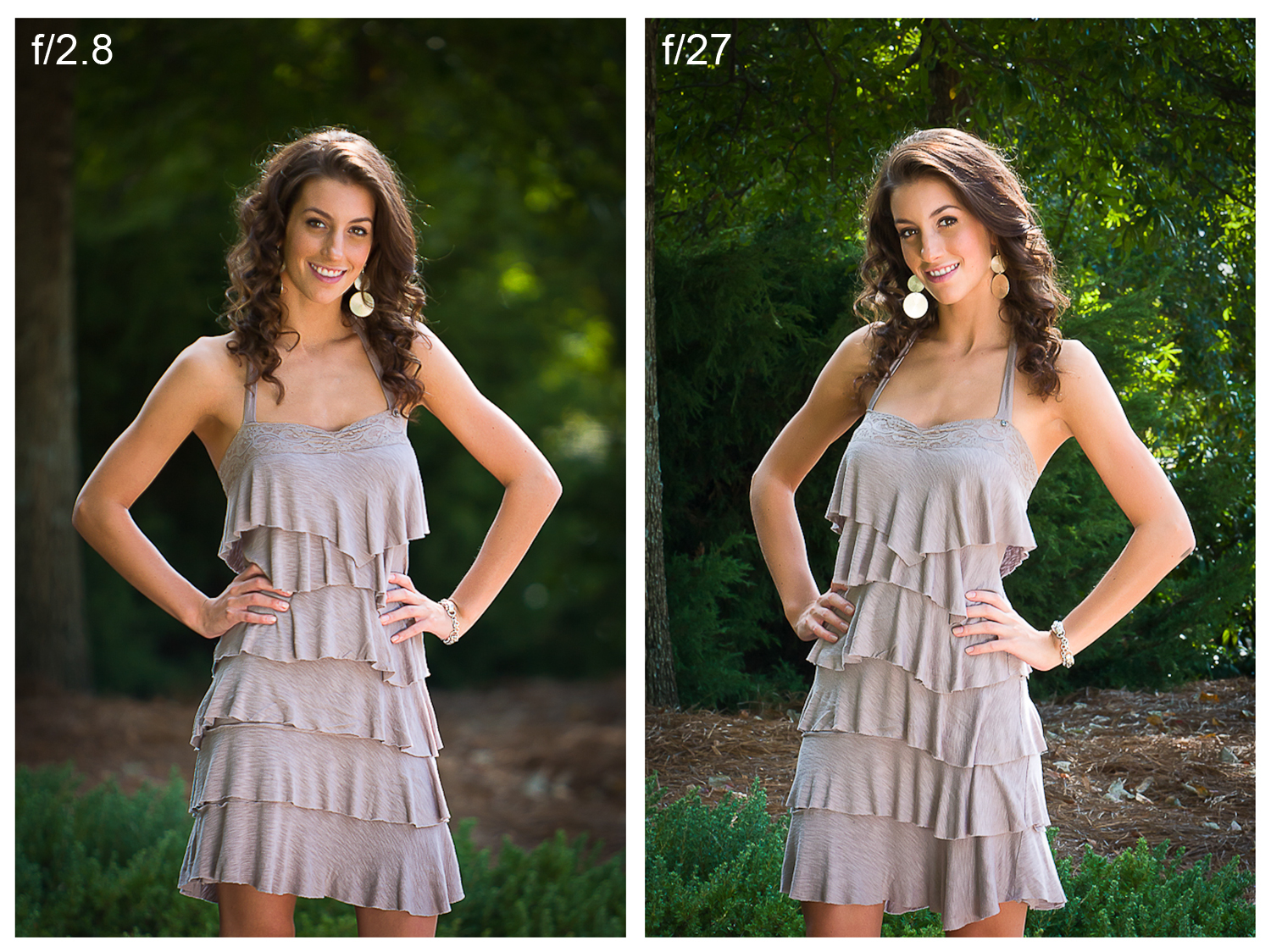
In the next month or so, I’ll be starting up a beginners course in using a digital SLR camera and how to take better photos.  I’d have thought that with all of the images I’ve taken in and around the Atlanta area, I’d have everything I needed to visually demonstrate the various concepts outlined in the course.  But that wasn’t the case.  To fill in the holes, I placed a casting call on a popular modeling site; Rachael Boone answered the call and the shoot was scheduled.  Two of the concepts we shot were lens perspective and the effects of aperture on the image.

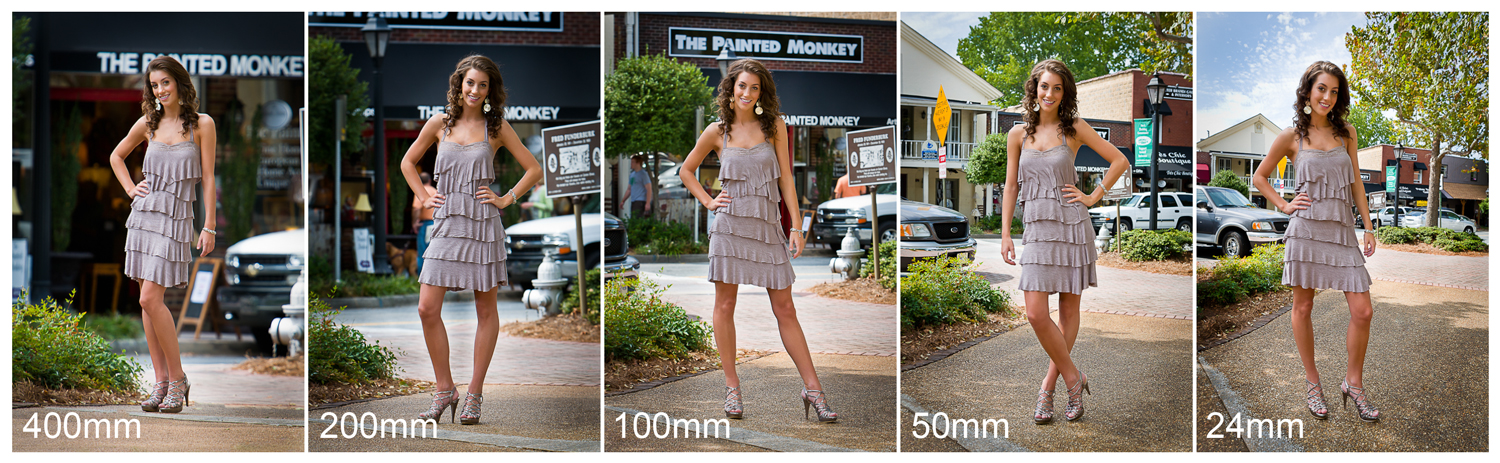
We started in a small square in the Roswell Historic District that’s quiet, has fairly low foot traffic and shops that show in the background. Rachael posed so the shops were to her back and I started across the square from her using a long focal length lens.  The lens perspective effect is seen by keeping the subject, in this case Rachael, the same size in the frame and shoot with a consecutively shorter focal length lens.

This series demonstrates the effects lens perspective has on images.  At 400mm, the image shows the effects of lens compression and it looks as though Rachael is directly in front of the shops.  As the focal length decreases, the images start to show depth and finally at 24mm, it looks as though the shops are very far away.

The lens aperture used to create an image has large effect on the image too.  It creates the depth of field, the area in the image that is in focus, in the image.  Depth of field can bring the total image in to sharp focus or allow the photographer to keep only the subject in focus and thus keep the viewers attention there.

In these images, at the shallow depth of field an aperture of f/2.8 creates, the foliage behind Rachael has a pleasant blur and the viewers attention is drawn to her great smile.  An aperture of f/27, creates a large depth of field and adds the probability that the viewer will glance at Rachael but then start scanning the image to see what else may be in it.

These are just small tastes of what will be covered in the class.  I’m looking forward to starting it up and transferring some of the knowledge I picked up as commercial photographer over the years.

I also want to thank Rachael for helping me in creating these images.  She made my job much easier!  Stay tuned for more info about the “Introduction to DSLR Photography and Taking Better Photos” class.


Looking for an Atlanta photographer…

“I ‘googled’ using terms like ‘Atlanta’, ‘Alpharetta’, ‘head shot’ and ‘photographer’ while looking for someone to create my image.  You came up in the search.  I looked at a couple of other websites prior to viewing yours and compared to those sites, I thought yours was very professional, well done and easy to navigate.  When I looked at your images, I knew you were the photographer I wanted to create mine.”  Steve said that when I was curious and asked how he had found me.  Because he’s a salesman at a technology company, I wasn’t surprised when he answered using search terms instead of just saying “Google”.

He’s been with his company for a while now and they’ve long asked him to get a professional head shot done for their website, marketing and sales collateral, and to have something to use for speaking engagements.

The images were created on a standard white background to make them as generic as possible.  Steve, being a bit more discerning, wanted his images to stand out more.  Working some Photoshop magic, I exchanged the standard white background with a mid-grey color and added a gradient to separate him from the background.

Backgrounds make a new image!

Both images are fantastic and although I’ve been doing this for a while now, it sometimes surprises me how a change like this creates a different feel to the image.  Steve decided to go with the image on the right.  What do you think?

As an Atlanta photographer I strive to separate myself from the pack and it’s always nice to hear when people notice.  I want to thank Steve for being so detailed in his answer to my query and for choosing me to create his executive portrait.

Creating Better Vacation Photos, Part 2

In Part 1 of Creating Better Vacation Photos by using the Rules of Composition, we covered Having a Subject, Filling the Frame, and the Rule of Thirds.  If you’ve practiced these in your photography you are probably noticing that you are taking better images already.  In this part, we’ll talk about:

The Horizon – Where to Place It
Leading Lines
Leaving Some Space

If you missed Part 1, you’ll find it further down in this blog.  So let’s get started!

  • The Horizon – Where To Place It

The general Rule of Composition here is to not put your horizon in the center of the image.  Put it on or near either the 1/3 or 2/3 composition line.  Here we have two views of the same image.  The first one is a general snapshot of a beach in southern California.  It’s okay, but it’s not something that tells a story or that you’d print and frame.  Note in particular that the horizon in the top image is in the middle of the photo and the subjects are centered.

Encinitas Beach

Encinitas Beach - Crop

The image on the bottom is a crop of the top and I’ve used the Rules of Composition to fix it.  The surfers are placed according to the Rule of Thirds, and doing this has brought the horizon closer to the 2/3 line.  It’s a much more pleasing photograph and easier for the viewer to get a sense of and feel a part of what is happening on the beach.  In general, to emphasize the upper part of the image, the horizon should be at the 2/3 line, and by placing it at the 1/3 line, you emphasize the bottom part of the image.

  • Leading Lines

Leading lines are meant to brings the viewers attention to specific areas of the image.  They can go horizontally, vertically, or diagonally through the image.  The image below demonstrates the rule of Leading Lines.  The grasses around the edge of the image lead the viewers’ attention directly to the center and the subject of the image.

Leading lines
 
The image below is an example of leading lines that converge.  These lines bring the viewers attention directly to the person walking across the bridge.  Remember that leading lines can be anything as long as they lead the viewer in to the image and not out of it.
 
Converging lines
 
  • Leave Some Space
 
This Rule of Composition generally states that you should leave space for the subject to move in to or through the frame of the image.  If the subject is a person running from left to right, the right side should have space for the subject to run in to.  If not it looks as though the subject is running out of the photo.
 
In portraits, space makes the subject look comfortable.  Here are two versions of images leaving space.
 
Space
 
In the image above, because I made tight crop, I’ve placed a small space to the right side of the image keeping the subject from looking like she’s bumping up against the edge.
 
In the image below, the additional space on the right allows the subject to move in to the photo.  The other photographic technique used for this photo, although not a Rule of Composition, is called panning.  I used a slow shutter speed to capture some motion in her arms and legs at the same time I was following her with the camera in order to blur the background, giving the effect of her moving quickly in a still photo.
 
Moving subject in to the frame
 
  • Summary
 
I know it sounds like a lot to think about when taking a photo…and it is…and as you practice them, they’ll become second nature.  But if you remember to think about these Rules of Composition each time you look through the viewfinder and  prior to pressing that shutter release, your pictures will go from just snapshots to great vacation images in no time.
 
Be sure to leave a comment if you have questions or other comments.  Thanks for stopping by.


Creating Better Vacation Photos, Part 1


Everyone wants to capture photos of their vacation in order to remember what they did, where they went, and what they saw.  But most people just take snapshots.  Hopefully after reading both parts of this subject, you’ll have gained a few more skills in order create better images, ones that really capture the emotion and action of the locations you visited.  Because this subject contains a lot to think about all at once,  I’ve broken it in to two parts so that you can take some time and practice the concepts we will talk about.
  • Which Camera?
One of the most common questions I hear is “Which camera should I use to take better pictures?”  Well, I can tell you that it’s not necessarily the camera, but the person behind it that will capture the better pictures.  The camera is only a tool, and today just about any camera from a point and shoot to a professional single lens reflex camera will allow you to capture great images.  It’s all in how you use that tool and the techniques you follow when capturing the photos.  Some of those techniques are contained in the Rules of Composition and we’ll talk about a few of them here in Part 1:
Have a Subject
Fill the Frame
Rule of Thirds
But here’s a very good tip about whatever camera you use:  Learn how to use your camera BEFORE leaving on vacation!  If you go out and buy a camera the day prior to going to Europe, you won’t be able to use it to your fullest extent because you won’t know how to use the tool (camera) that is in your hand.  This of course entails that little known three letter acronym, RTM, which means Read The Manual!  Get the camera in enough time to learn how to take an image, view it, delete it if necessary, prevent it from being overwritten, and most importantly how to transfer the image from your camera to your computer or just print it from the camera if that’s what you wish to do.
You might also want to purchase more than one memory card for your camera.  There is a school of thought among professionals to not buy the biggest card available, because it if goes bad or get lost or stolen, you’ve lost every one of your photos.  Imagine that happening on the way home after you’ve taken hundreds of pictures on your vacation!  Not a very pleasant idea.
  • Have a Subject
With many photos I’ve seen, I’ve had a difficult time determining what the subject of that photo is.  Make sure that whatever you are shooting has a definitive subject so that the viewer won’t have problems determining what it is.  Like this image:
Have a Subject
I’d bet a paycheck that you know what the subject is, and have figured out that whomever was on the wrong end of that weapon is going to have a bad day!  With this photo, I’ve used another Rule of Composition to help define the subject.  It is called selective focus and being able to control that with the camera may depend on your camera.
  • Fill the Frame
Make sure you fill the frame with your subject.  Too much space around your subject can take the viewer away from the intended focus of the image.  As you can see with the two images below, both are very nice and would look good on a desk or a wall.  The image on the left has a bit of space around the subject and if the background were of an outdoor park you may look away from the subject to see what was back there.  But the image on the right fills the frame of the photograph keeping your attention where it should be and really shows off the eyes and the fantastic smile of the subject.
      Loose Portrait        Tight Portrait
You’ll also notice that the subjects body isn’t directly facing the camera.  When taking people portraits, have them turn a little, around 45 degrees to the camera position, to give them a very pleasing thinning effect.
  • Rule of Thirds
This is the rule that is broken most often causing great images to be just snap shots.  When looking through your viewfinder, imagine two vertical lines about 1/3 and 2/3 of the way from the left of the viewfinder screen as well as two horizontal lines about 1/3 and 2/3 down from the top of the viewfinder screen (see image below).  Where these lines intersect is normally where the subject of the photograph should be.
Rule of thirds
You may say the image of the young lady above doesn’t conform to these lines, but look again.  The viewers’ attention on portraits is always drawn to the eyes first and her eyes are essentially on the 1/3 from the top line.  You can’t always use one of the intersections and when you can’t, place your subject on one of the other lines and you will still have a great image.
Now look at this image.
The Biltmore House
The subject, the Biltmore House in Asheville, NC, is placed directly on the Rule of Thirds creating a very pleasing image.
This image also uses another Rule of Compensation called framing.  I used the foreground foliage to help frame the house creating an image that could be a calendar shot.
Well now you have some of the most important concepts of rules of photography to use when taking photos.  Go out and practice and if you think about just these three rules before pressing that button, you’ll notice better images almost immediately.
Stop back in a week or so, or subscribe to the RSS feed to be notified when Part 2 is posted that talks about:
The Horizon – Where to Place It
Leading Lines
Leave Some Space
Leave a comment if you have questions or other comments.  Thanks for stopping by.


Contact us

Photography is by appointment only.
Call or email now to setup a consultation!

di Sogno Photography
1005 Alderman Drive
Suite 101
Alpharetta, GA 30005

ph: 770-817-0945
e: info@disognophoto.com

Random Images